

A committee rarely has the whole picture in front of it at once. One person knows the learning outcomes, another wrote the assignment, and the rubric gets drafted in a meeting where neither document is open. So the rubric asks raters to score oral communication, and the assignments selected are all written memos. Nobody notices until scoring begins. By then the course has ended.
That gap in shared context was the starting point for the second module of our Roundtable Series on rubric design, held on November 18. Module 1 looked at where rubrics fall short. This session was hands-on. We set up an AI agent to review a draft rubric before data collection, ran it live on a sample rubric, and asked the room what it would take to use this in committee work.
The room included faculty, Assurance of Learning committee members and accreditation leads from business schools in the US and Canada.
A sentence to fix before, a cycle to fix after
In Module 1 we looked at three ways a rubric criterion fails at scoring time:
Outcome drift: the criterion measures something other than the learning outcome it was written for.
Vague criteria: a word like “persuasive” means something different to each rater.
Data hole: the criterion asks for evidence the assignment never produces, such as “confident delivery” in a written memo.
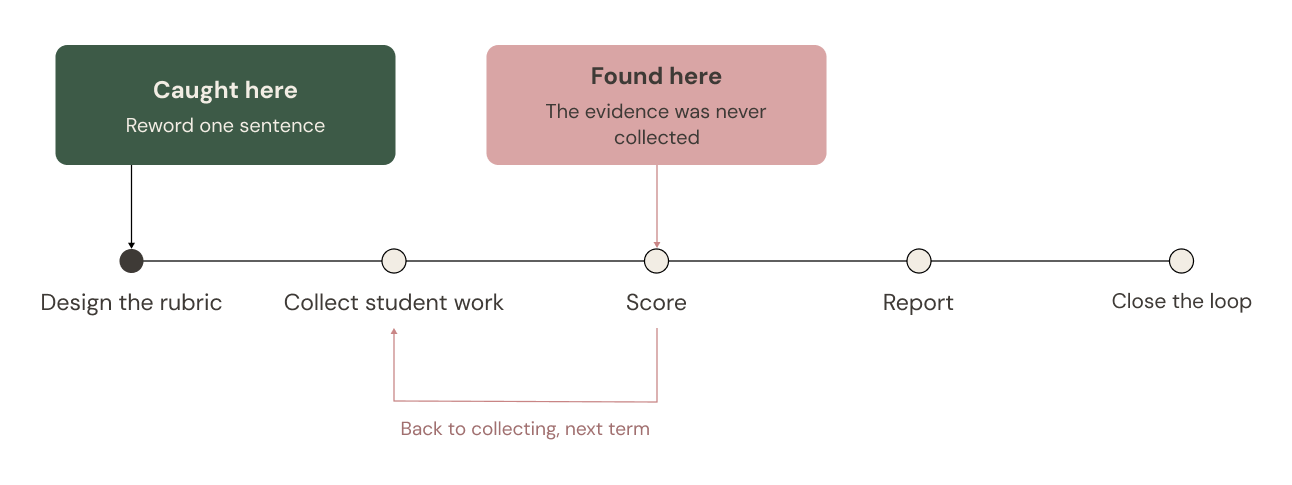
Committees usually find these during scoring. Caught at the design stage, a flaw like this costs one reworded sentence. Found at scoring, the same flaw can cost a full cycle, because the evidence was never collected.
Most committees go straight from rubric to scoring. Our position is that one review step before data collection is worth adding, and that an AI agent can do the first read.
What an agent adds
Many of us already use a chat interface for this kind of work. You upload copies of your files, prompt each step, and the result stays in the conversation.
An agent uses the same AI and works differently. You point it at a folder. It reads the files there, carries out the review from one instruction, and saves its work back to the folder. The folder is still there next cycle, so each review starts from the same context.
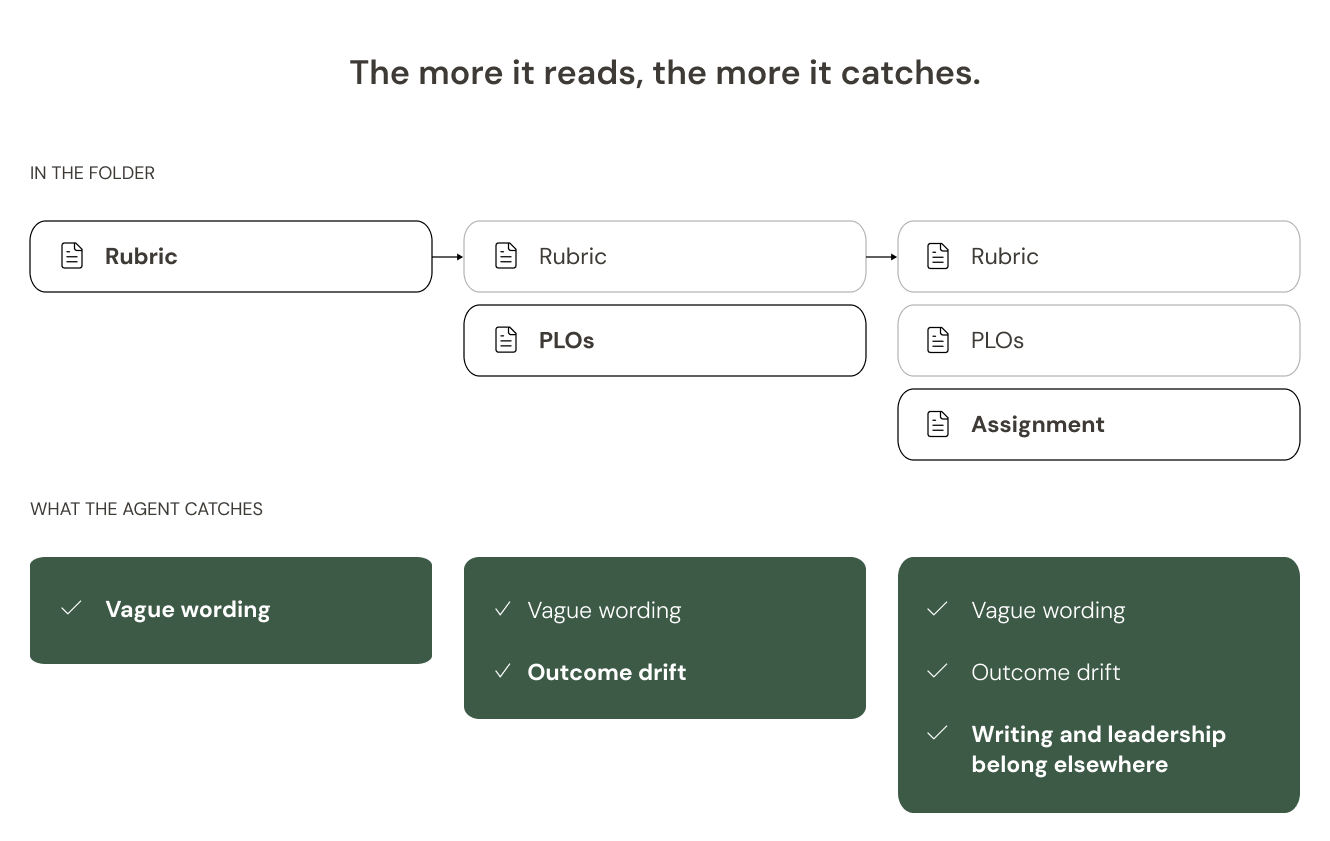
We borrowed a term from software teams for that folder: a monorepo, one place for everything a program’s assessment work depends on. What the agent catches depends on what the folder holds:
Rubric only: it can comment on vague wording.
Rubric and assignment prompt: it can also see that a criterion has no evidence behind it.
Rubric, assignment prompt and program learning outcomes: it can also see that a criterion belongs to a different outcome.
Where the documents live
Before the demo, we asked the room whether they could gather these documents into one folder today.
The mission, learning outcomes and rubrics were easy. Assignment prompts were the hard part. Participants told us that syllabi sit in a standard place, but assignment prompts live with each faculty member and each course. They are usually built into the LMS and owned by the instructor, who has to be willing to share them.
One participant separated the work into three steps:
Creating the rubric: this does not depend on any assignment.
Matching an assignment to the outcome: finding the assignment that will supply evidence for each criterion.
Scoring: evaluating a sample of student work against the rubric.
The room saw the agent helping most with the second step. It needs assignment prompts and no student work. And since AoL tests at the program level, the folder would hold prompts from across the program, limited to the courses that could plausibly cover the outcome.
One participant described how this usually goes. A faculty member glances at the rubric and says they have an assignment for it. Later it turns out the assignment does not cover every criterion, and scoring gets difficult.
When no assignment fits
One participant asked what happens when the review shows that no assignment fits the rubric. Does the curriculum committee then ask an instructor to add one?
The room did not settle this. One participant said it depends on the institution, and that committees try not to tell faculty how to teach, out of respect for academic freedom. They pointed out that the gap raises its own question. If a program says communication matters and no assignment anywhere in the curriculum assesses it, the committee has to ask why. A program that never tests whether students are learning something cannot say it is teaching it effectively.
A review can flag several issues like this one. Each takes time to work through, and all of it needs faculty buy-in. We also noted that a PLO owner can start alone, with one draft rubric and one assignment prompt they already have, to check whether it is the right artifact.
What the agent did with a draft rubric
For the demo we used ChatGPT Codex, since many universities already have ChatGPT Edu. Claude Code works in a folder the same way. Both names suggest tools for programmers, but you give them instructions in plain language.
We built a folder for a fictional business school. All of it was dummy data:
A mission statement
Program and course learning outcomes
An assignment prompt
A draft rubric
A short readme describing the files
We created a project, gave the agent access to that folder and nothing else, and pasted one prompt asking it to review the rubric against the outcome and the assignment.
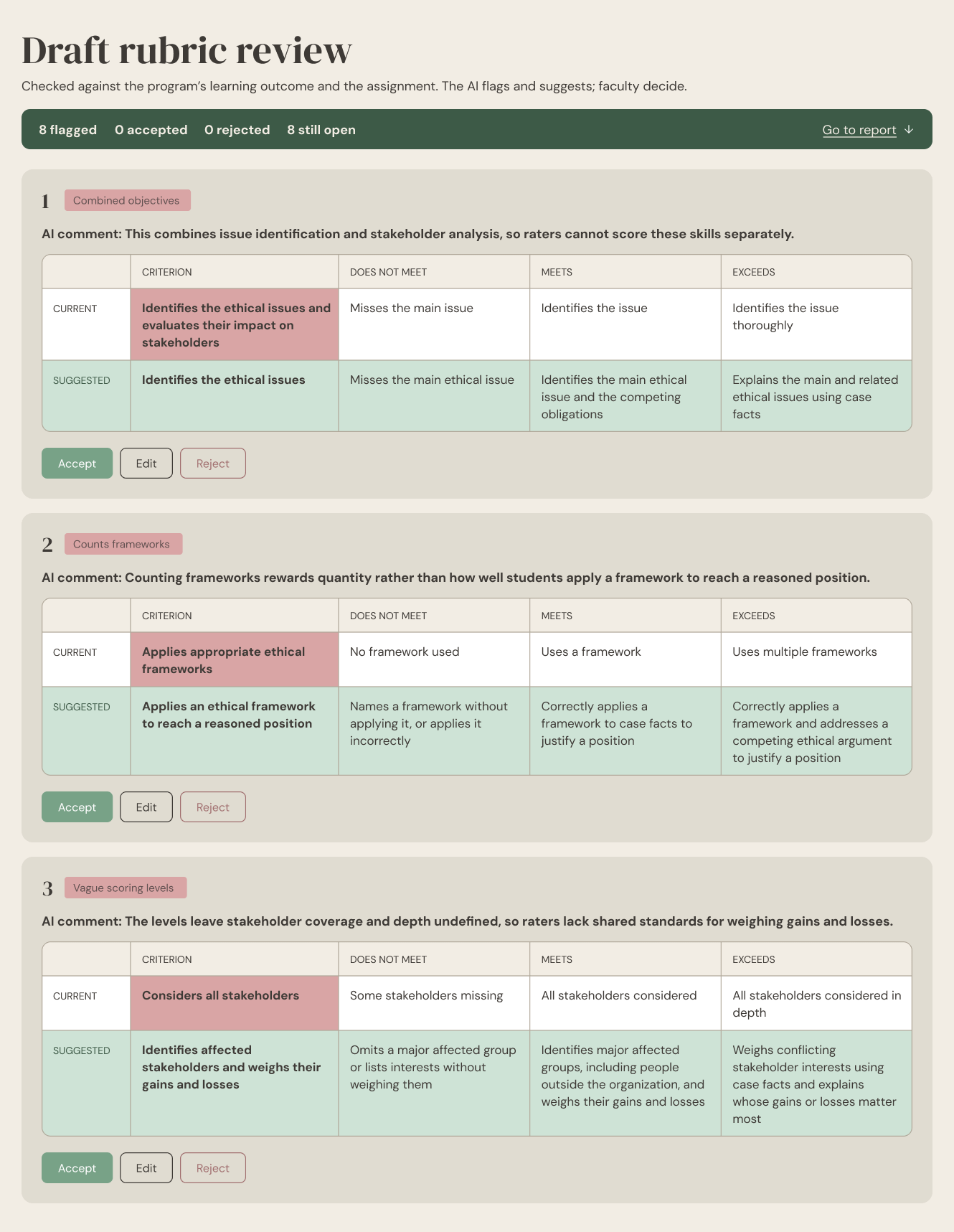
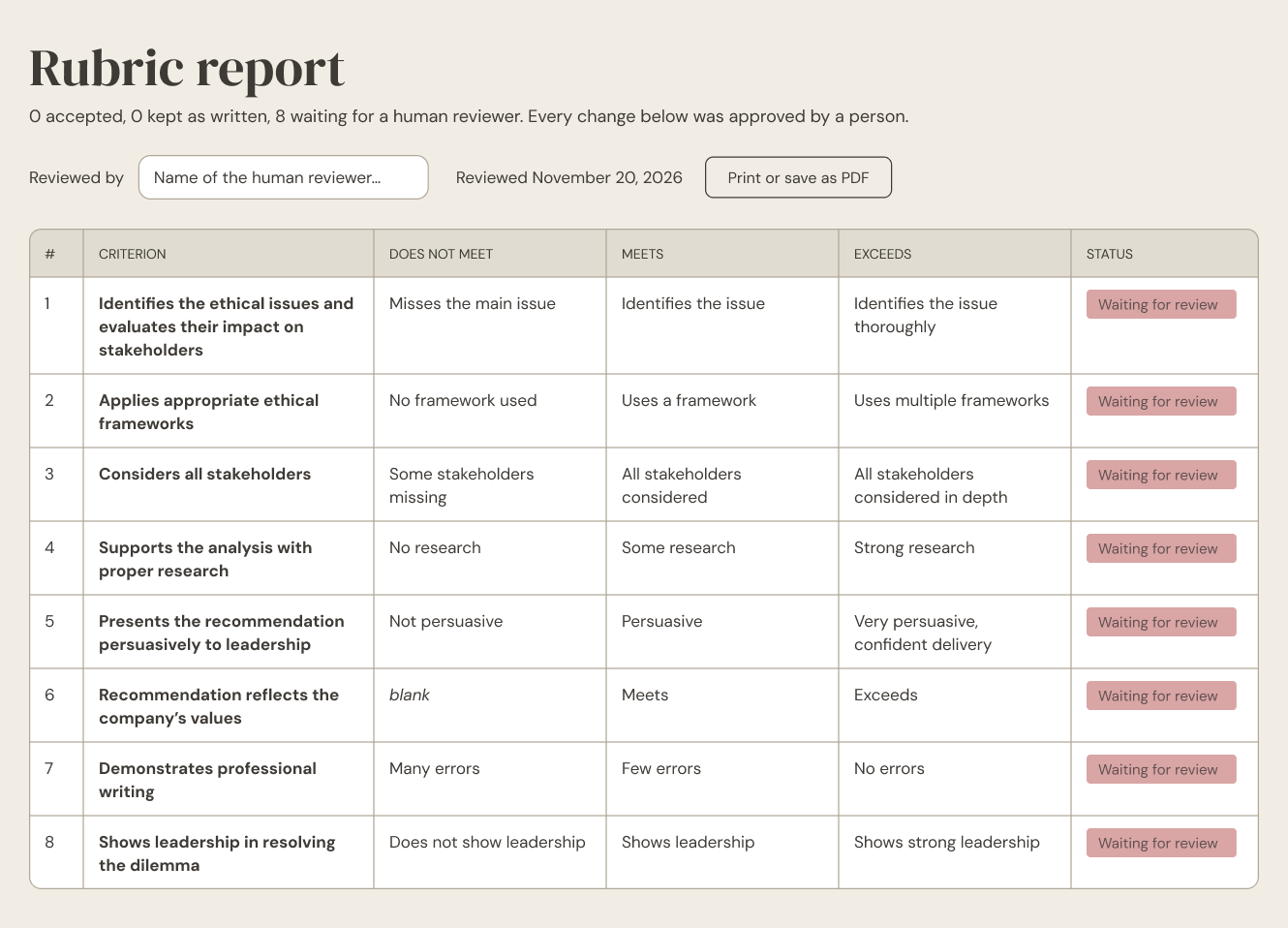
The agent flagged all eight criteria and produced a review page. For each criterion it showed the current wording, a comment and a suggested revision. A few examples:
A double-barreled criterion: it combined two objectives, and the agent suggested splitting it.
Wording that did not match the assignment: the agent proposed language drawn from the assignment prompt.
A criterion in the wrong place: the agent suggested removing it because it fit a different outcome better.
We accepted some suggestions and rejected others. Each decision went into a running report showing which criteria were added, revised, removed or kept as written. The report can be saved to the folder and shared with the rest of the committee.
The interactive page was something we built for the demo. With the same folder and a simple prompt, you would get the suggestions as plain text or a document.
The room responded to the time this could save. One participant said it would motivate them to get everything into one folder. Another thought of the hours their committee spends on double-barreled criteria and wording. The committee would still review and approve every change.
Guardrails before you try this
We shared four guardrails for anyone trying this on their own:
Check your account and AI policy: use your institution’s Edu account, and read your AI use policy first.
Be transparent: tell your committee that you are using AI to review the rubric.
Keep student data out: no names, IDs, grades or student work in the folder. A rubric review does not need them.
Stay in the loop: the agent suggests and faculty decide. Keep a record of what was accepted, edited or rejected.
One participant asked whether the agent would notice student data in the folder and block it or warn you. By default, it would not. This is a workflow inside a general-purpose tool, and it will not flag student data unless it has been instructed to. An institution can add that check through saved instructions that IT sets for everyone.
That led to a distinction we will return to in a later session. Some tasks suit off-the-shelf AI tools. Others, like artifact scoring, involve student work and many points of human review, and they likely need a dedicated application with the guardrails built in. Rubric review sits in the first group. Our position is that this makes it a safe place to start.
Faculty in the loop
We asked whether the room could see this in their own committee’s work. One participant saw value in it as a process to test, and asked how it would read in an accreditation report.
Another participant’s reading was that AACSB supports the use of AI in the accreditation process, as long as faculty keep the final say. What a peer review team wants to see, they added, is a clear account of the reasonable efforts a school is making to improve both its process and its curriculum.
Participants also saw uses beyond AoL. One suggested running the same check inside a single course, following the thread from learning outcomes through course materials to assignments and assessment.
Key takeaways
Review the rubric before data collection. The same flaw costs a sentence at the design stage and a cycle at scoring.
Context decides what gets caught. An agent that reads the rubric, the assignment prompt and the learning outcomes together finds flaws that no single document shows.
Assignment prompts are the hardest document to gather. They sit with instructors, and sharing them takes faculty buy-in.
A review can surface curriculum questions, such as an outcome that no assignment assesses. Committees should expect them.
Rubric review needs no student data. General-purpose tools will not flag student data on their own, so the folder has to be clean from the start.
Faculty make every decision and keep the record.
What’s next
Three things are on our list for future sessions:
A better review workflow: how faculty see, judge and record each suggestion.
Saved instructions: skills and AGENTS.md files, so the agent runs the review the same way each time for a given institution.
A connection to the LMS through MCP: so assignment prompts do not have to be exported by hand. This needs IT approval and admin authorization, and we have not validated it yet.
The roundtables will reconvene in January. If you would like the demo folder and prompt to try this on a rubric of your own, or want to compare notes on how your committee reviews rubrics, write to us at hello@aolia.ai.